The errors might arise from seven different issues.
by JANEMOLLY ACHIENG
Audio By Vocalize
You've bought tokens, but your meter won't connect.
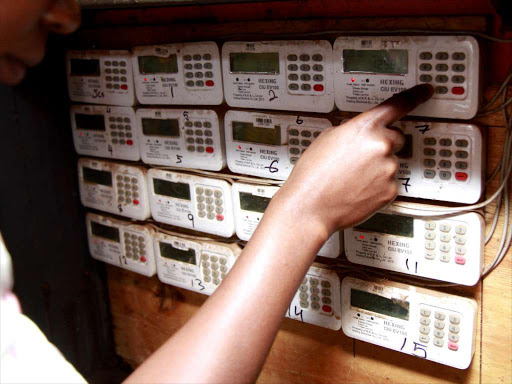
Meter errors occur when there is an issue with the electricity
meter, resulting in inaccurate billings and readings.
The errors occur when a consumer has purchased a token, but the meter fails to connect.
The errors might arise from seven different issues.
Kenya Power has issued a comprehensive faulty meter series
that will empower consumers with expert troubleshooting knowledge to help them
quickly resolve certain meter errors.
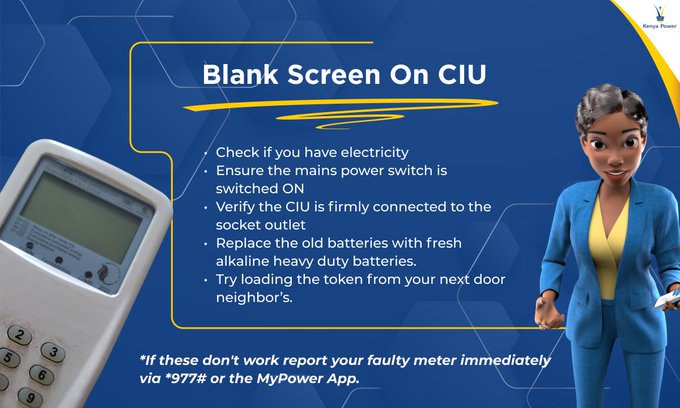
The first error can be a blank screen on the Customer
Interface Unit (CIU).
This issue can be fixed by checking if you have electricity;
If not, ensure the mains power switch is switched ON.
Then, verify whether the CIU is
firmly connected to the socket outlet, replace the old batteries with fresh
alkaline heavy-duty batteries, and try
loading the token from your next-door neighbor’s house.
“To do this, take your CIU to your neighbor's house and plug
it directly into their wall socket to load your tokens,” Kenya Power noted.
This will work because both meters are on the same
electrical line, allowing the CIU to communicate with your meter even when
connected to a different power source.
If these options don't work, report your faulty meter
immediately via *977# or the MyPower App.
The second error can be the "CONN FAIL," which usually
indicates a communication problem between the in-home keypad (CIU) and the
meter outside.
To resolve this, plug the CIU directly into a wall socket
(avoid extensions), and use high-quality alkaline batteries.
As a last resort, try connecting to a neighbour's socket if
they're on the same electricity line.
If all these fail, contact our customer care centre at 97771.
The third error can be the PLC Error, which usually indicates
a communication issue between the CIU and the meter.
Blank Screen on CIU error
To resolve this, ensure your meter is plugged directly into a
wall socket when loading tokens.
Then check that all connections
are secure and tight.
“Make sure there's no interference
from nearby electronic devices,” Kenya Power stated.
The service providers also noted that proper connection is
essential for successful token loading and meter communication.
The fourth error can occur when the meter fails to connect
when loading tokens.
To resolve this, replace old batteries with fresh alkaline
batteries, then use a direct wall socket (avoid extensions).
You will then check for the blinking
red light at the meter box and ensure your breaker is switched ON.
The fifth error can be a bypass that the service providers
have cautioned consumers not to attempt fixing for themselves, as it
requires professional assessment.
When such an error occurs, report it immediately by dialing *977#
or using the MyPower App under "faulty meter".
A consumer can also call 97771 to
launch an official report, and a technician will be dispatched to identify the
exact cause of the bypass error.
The sixth error can be the loose glass on the postpaid meter.
To resolve this report this issue immediately via *977# or
MyPower App, as it may compromise meter readings and electrical safety.
“Do not attempt to repair the glass yourself,” Kenya Power cautioned
consumers.
The last error can be tampering, which requires professional
assessment.
A consumer should report immediately by dialing *977# or using the MyPower App under "faulty meter" or calling 97771 to launch an official
report.
This is premium content
Subscribe to Continue Reading
Help us continue bringing you unbiased news, in-depth investigations, and diverse perspectives. Your subscription keeps our mission alive and empowers us to provide high-quality, trustworthy journalism. Join us today to make a difference!